Sales & commissions
A commission tracker built for real estate agents
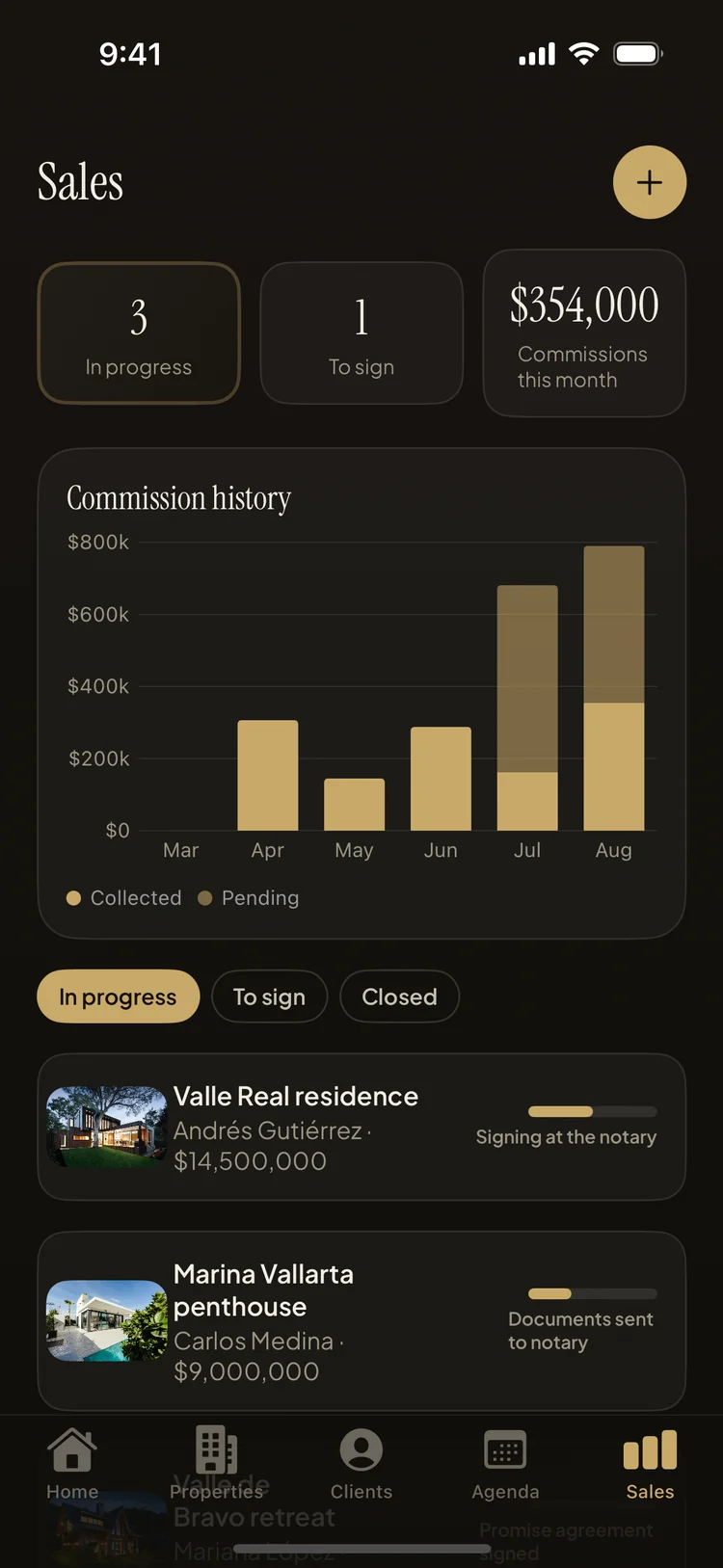
The short answer: most agents can quote every listing price in their inventory but can't say what they'll actually earn this quarter. Property Agenda fixes that at the source: you record the commission the moment you link a sale, and the app keeps a running picture — deals in progress, deals waiting to sign, sales volume, and a monthly chart of commissions collected versus still pending.
Commission income is lumpy by nature — nothing for six weeks, then two closings in one. What makes it feel chaotic isn't the lumpiness, it's not knowing: which deals are actually moving, what's stuck at the notary, and how much of the money you're mentally spending is still conditional. A spreadsheet could answer this, but spreadsheets get updated at tax time, not deal time. The fix is to capture the commission where the deal already lives. Agents who do know their number aren't better at math — they simply record the commission once, when the deal is created, and let the tool keep the running total.
What Property Agenda tracks per deal — and across all of them
- Commission at link time. Every sale is created as client + property + agreed price + your commission, so the earnings number exists from day one, not after closing.
- Stat tiles for the pipeline. Deals in progress, deals ready to sign, total sales volume, and commissions this month — the four numbers that describe your business, on one screen.
- The monthly commission chart. Collected versus pending, month by month — the difference between money in the bank and money on paper.
Tracking commissions in Property Agenda, step by step
- Link the sale as soon as it's real. Pick the client and the property, enter the agreed price and your commission — under a minute.
- Advance the deal through its closing stages. Property Agenda tracks six stages from promise agreement to key handover; each one you advance moves a pending commission closer to collected. Here's how the closing pipeline works.
- Check the stat tiles weekly. "In progress," "to sign," volume and this month's commissions tell you in ten seconds whether the quarter is on track.
- Read the monthly chart before making promises. Collected versus pending is the honest answer to "can I afford it" — and to "do I need to prospect harder this month."
Why tracking pending commission keeps the pipeline moving
A pending commission with a number on it is a to-do list. When the chart shows a figure sitting in "pending" for a second month, you don't feel vaguely uneasy — you open the deal, see it's been waiting on documents to the notary, and make the call that unblocks it. Deals rarely die from rejection; they die from nobody noticing they stopped. A visible pending number is the noticing, automated.
Pending also disciplines the promises you make to yourself. It's chronic in this business to count a deal as income the day the offer is accepted — then the financing wobbles and the mental budget turns out to have been fiction. Keeping collected and pending as two separate lines on a chart you see weekly builds the habit of treating a commission as real only when it lands, while still giving the pending money the attention it needs in order to land.
Start with the deals you already have
You don't need a backlog migration — link the two or three deals currently in flight, and the tiles and chart come alive immediately. Sales tracking works on the free plan, alongside 5 properties and 10 clients; Pro removes those caps when your book grows. And because everything is stored on your phone and synced through your own iCloud, the numbers are with you at the closing table, not on an office computer.
Know your number for this quarter
Property Agenda is free on the App Store. No account, no login, works offline.
Download Property Agenda